 Tabsafe
The browser updated overnight and your tabs are gone.
Lost your tabs after a crash or an update? Tabsafe keeps backups as files on your computer and restores them in one click. It imports your OneTab and Session Buddy exports, so you can switch without losing the lists you built.
Updated 19 October 2026, version 1.1.0. For Microsoft Edge on desktop and Firefox. No account.
Downloads/Tabsafe/tabsafe-backup-2026-10-05.jsonA backup file the browser's update cannot reach.
Bring the whole session back
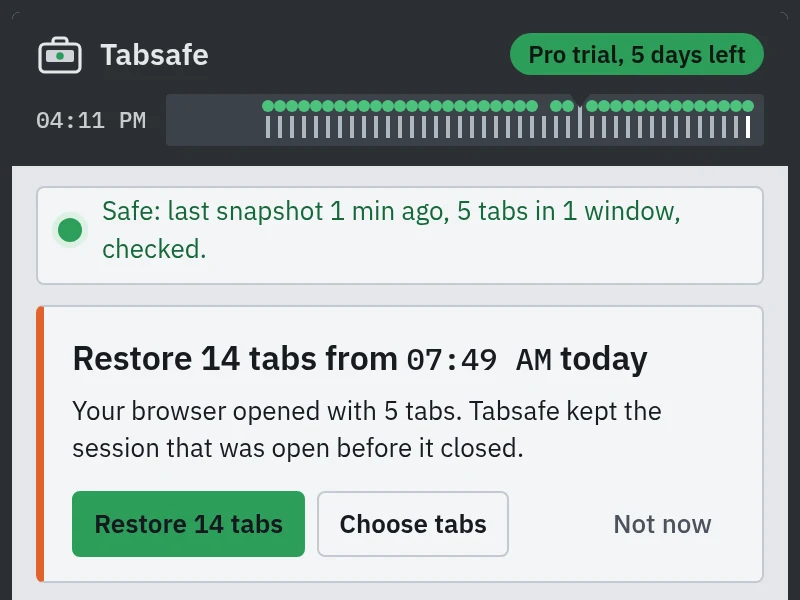
When the browser opens with far fewer tabs than the session it closed with, the panel offers to restore that session, with the tab count and the time it was saved. Restore all of it, or choose the tabs you want.
Stop, Resume or Retry while it runs; the tabs already open stay. Then the card lists what came back, with Undo, Close extras and the pages the browser would not open.
Saved tabs are only as safe as the extension's storage
A tab list lives in the browser's own extension storage. When that storage is wiped or migrated badly, the list goes with it. These are reports, not tests we ran.
- OneTab users on Firefox wrote one-star reviews in August and September 2026 saying all their saved tabs were gone after an update (review), and another says the data was wiped when free disk space fell below 10 GB (review).
- When Session Buddy version 4 moved its storage from Web SQL to IndexedDB, some users were reportedly left with an empty database, according to a third-party recovery write-up.
- Session Buddy's own data reliability page warns that any data an extension stores locally is at risk.
A file saved outside the browser profile answers that risk, because an update or a cleared profile cannot reach it. Tabsafe writes that file for you every week, and every day on Pro.
What free does
The free version is a complete tab saver, with no account and no card.
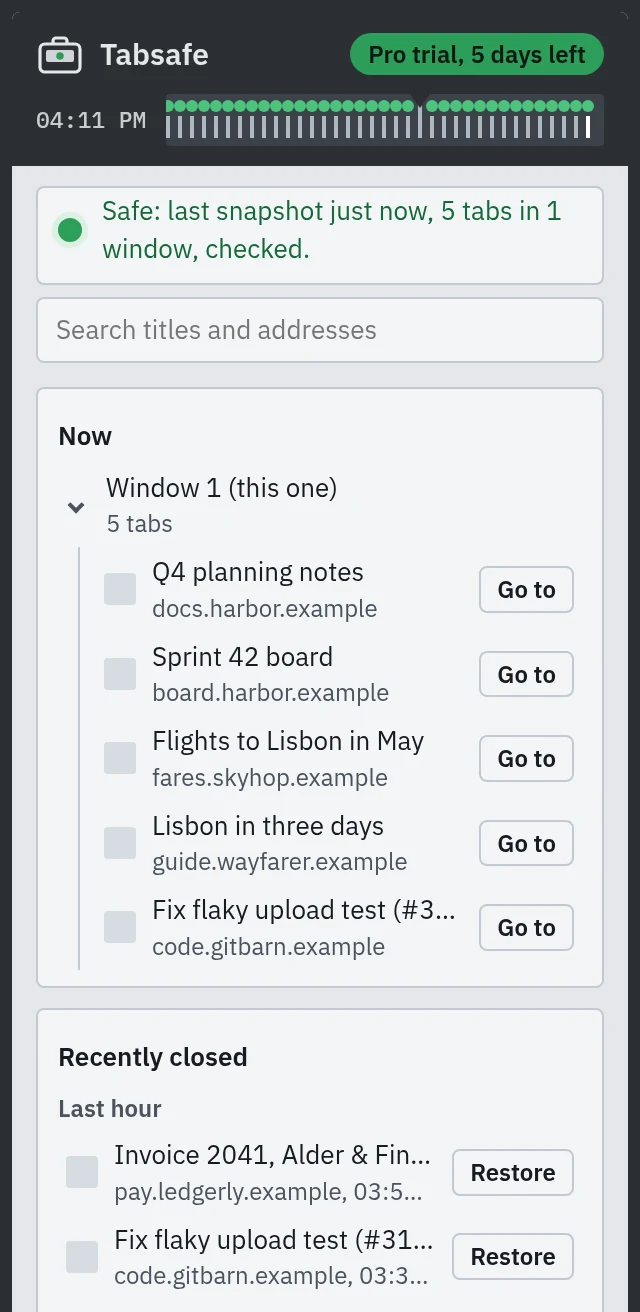
- Automatic snapshots of your open windows, tabs and groups, kept 14 days
- A log of closed tabs, kept 14 days
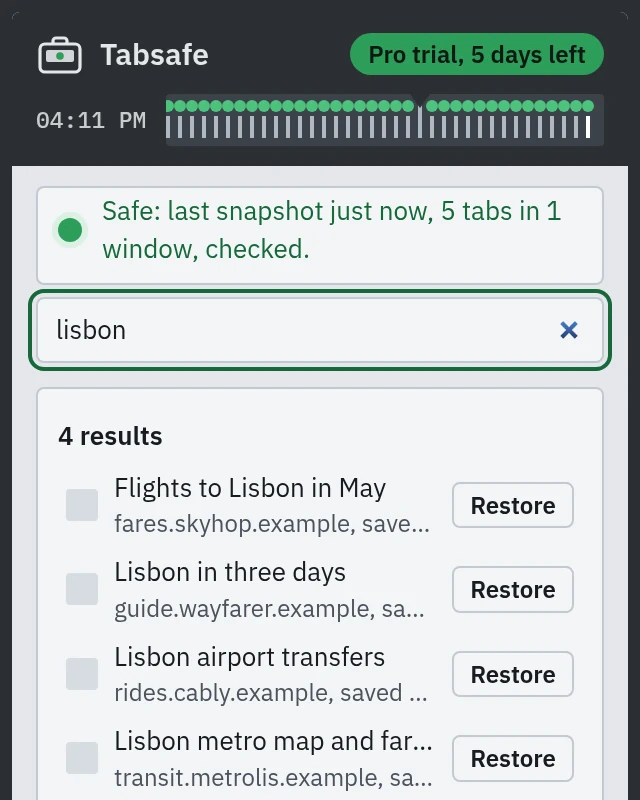
- Restore a tab, a group, a window or a whole snapshot, and search across all of it
- Unlimited named sessions with folders, Save and close tabs, a Back up now file in your Downloads folder, and restoring from a backup file
- Import a OneTab text export (one
url | titleper line) or a Session Buddy JSON export - Works in Microsoft Edge (side panel) and Firefox (sidebar)
- Your lists stay in the browser. Tabsafe has no server that holds them
Missing something? Tell us what Tabsafe should do next at tabsafe.pages.dev/roadmap.
Pricing
Free covers snapshots, the closed-tab log, restore, search, import, unlimited named sessions, Save and close, Back up now and a weekly backup file. Pro keeps history for 365 days, writes backup files every day and checks the library every week, for €12 for 6 months, €19 for a year or €49 for Pro forever.
| Feature | Free | Pro |
|---|---|---|
| Automatic snapshots, closed-tab log, restore and search | Included | Included |
| Import OneTab and Session Buddy exports | Included | Included |
| History kept | 14 days | 365 days |
| Named sessions | No limit, with folders | No limit, with folders |
| Back up now to your Downloads folder, and restore from a backup file | Included | Included |
| Automatic backup files, optionally keeping only the newest few, such as 10 | Every week | Every day or every week |
| Weekly library check | By hand | Every week |
| Safety line: when your tabs were last saved, with every save read back and checked | Included | Included |
| Browsers per licence | Not applicable | Up to 3 |
| Price |
€0 forever No account, no card Add to Edge Add to Firefox |
€19 for a year €49 for Pro forever €12 for 6 months Get Pro, 1 year, €19 Get Pro forever, €49 Get 6 months, €12 |
You get 7 days of Pro, free, with no card. After that Tabsafe stays free unless you buy a pass. If a pass or the trial ends, history older than 14 days stays stored and is listed again with Pro. How buying works.
Questions
- Which browsers does it work in?
- Microsoft Edge and Firefox, on desktop.
- Is Tabsafe a OneTab alternative?
- Yes. Like OneTab it keeps your tabs as lists you can restore, and it also takes automatic snapshots and logs closed tabs. It reads a OneTab text export, so you can switch without retyping. Tabsafe vs OneTab.
- Is Tabsafe a Session Buddy alternative?
- Yes. It saves windows and groups as sessions, restores a tab, a group, a window or a whole snapshot, and imports a Session Buddy JSON export. Tabsafe vs Session Buddy.
- How do I save all my tabs?
- There is nothing to press. Tabsafe saves every open window and tab a few seconds after each change. To keep a named copy, type a name under Sessions in the panel and press Save. Back up now writes a file to your Downloads folder.
- Where are my saved tabs kept?
- In your browser's extension storage, and in the backup files you write to your Downloads folder. Tabsafe has no server that holds them. Details in the privacy policy.
- Can I bring my OneTab or Session Buddy lists?
- Yes. Tabsafe reads a OneTab text export and a Session Buddy JSON export. The OneTab text export carries no group names, lock or star state, so those are not imported. Another extension cannot read OneTab's storage directly, so import is by pasting or choosing a file.
- How long does Pro last?
- The 6-month (€12) and 12-month (€19) passes run from purchase and cover history, daily backups and the weekly library check. Pro forever, €49, has no end date. Your stored history stays on your device, and one key covers up to 3 browsers.
- How do I activate Pro?
- Pay on Payhip, copy the licence key from the receipt or the email, open the Tabsafe popup, press the plan badge at the top, paste the key into Licence key and press Activate. See pricing.
- What leaves my computer?
- Only activating Pro sends anything: your licence key, to check it. Tab addresses and titles never leave your computer.
- Where do I get help?
- Write to [email protected].